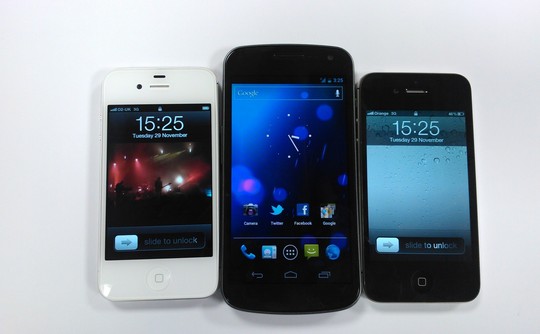
 The Samsung Galaxy Nexus has a lot of bragging rights. The Galaxy Nexus was built by Samsung in collaboration with Google to create a new addition to what has already been a fantastic line of Nexus devices. The newest addition the Nexus family is as thick as Apple’s iPhone 4S, but also boasts super fast 4G LTE capability, a speedy dual-core CPU, 16GB or 32Gb of storage, 1GB of RAM, a 5 megapixel camera with 1080p HD video support, NFC chip, and Google’s newest Android software, Ice Cream Sandwich or Android 4.0, if you like.
Ice Cream Sandwich is one of the biggest steps forward in the Android Software history. Like Apple’s iOS Software, Android 4.0 unites tablet and mobile phone so they will finally run the same software. More on this in my review below.
With all these new features and very strong specs, can this be the phone to beat? How does it stack up against Apple’s iPhone 4S? Or what about Microsoft’s Windows Phone 7? Lastly, is the Galaxy Nexus worth all the hype? Find out for yourself in my review below!
Hardware / Design
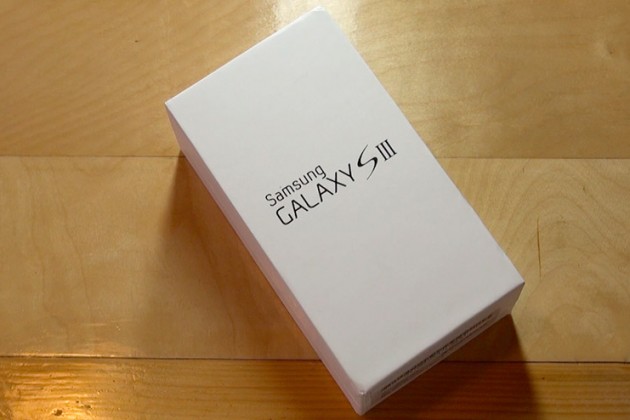
Samsung knows how to package their products perfectly. The box of the Samsung Galaxy Nexus is just the like the device itself; sleek and unassuming. It isn’t too hard on the eyes, but it will rouse your intrigue and make you want to see what’s inside. After you take off the top, you come face to face with the phone itself. Unwrapping that, you have access to the earbuds, USB cord, and wall charger. Also included in the box are a Owners Manual, as well as a Tips & Tricks guide. The earbuds included with the are what you would expect coming from a mobile phone – average – nothing spectacular, nothing terrible.
The Galaxy Nexus is a beautiful phone. The curves and the thin design of the device make the sheer size, (coming in at 5.33 inches tall by 2.67 inches wide) almost obsolete as the Galaxy Nexus weighs 0.3 pounds.
The case used on the Galaxy Nexus is a dark grey plastic. In recent products, Samsung has decided to use this plastic (instead of the metal and glass combination that Apple uses in the iPhone 4 & 4S), which is a bit of a disappointment. Holding the Galaxy Nexus in one hand and the iPhone 4S in the other, the iPhone feels much stronger and more durable than the shiny, flimsy plastic case used on the Nexus. On the front of the GN, Samsung is using a new screen named the Contour Display, which is ascribed to the slightly curved screen. The risk Google and Samsung took to create the first curved screen on a mobile phone really paid off well – the curvature of the Contour Display makes the Galaxy Nexus fit perfectly in the hand, as well as the aesthetically pleasing look.
Android’s newest emphasis on clean and simple means just that – they have kept the buttons and protrusions to a minimum. As customary for a Samsung Android device, the Galaxy Nexus has an on / off button on the right, and a volume rocker on the left. On the top of the device, you will find a speaker grille, a proximity sensor, and a 1.3 megapixel camera which is capable of recording in 720p HD video. On the back of the Galaxy Nexus, there is a 5 megapixel camera paired with a single LED Flash that is capable of recording in 1080p HD (more on this in the Camera section of my review). On the bottom, you have a micro USB port, 3.5mm headphone jack, as well as a LED notification light, which is very out of the ordinary for Android devices. The newly placed notification center light is RGB, which means that it can create many different shades of colors depending on the type of notification you received. For example, if you got a Gmail notification, the light would be blinking blue. If you received a Tweetdeck notification, it would alert you in yellow. This may not be the biggest selling point of the Galaxy Nexus, but as I say, “It’s the little things that make someone or something great”, and that is certainly true for Samsung and Google’s newest product. Sadly, there is no microSD card slot to enter more storage into the Nexus, so what you see is what you get.
I found the plastic casing on the back of the Galaxy Nexus to be very flimsy and when I tried to take the back off to take the battery out, it seemed as if it was going to break. Putting the battery door / back of the Galaxy Nexus back on the device proved to be a challenge as well – you have to slide your fingers down the back very firmly to get it back in place.
As with the past Nexus devices, the Galaxy Nexus has stepped up the competition to a new level in terms of design and manufacturing quality. It’s not too light to be considered very fragile or flimsy, but not bulky enough to be considered heavy or burdensome. One thing that could be improved upon on the Galaxy Nexus is the back casing.
Internals / Display
Google and Samsung left little to be desired when creating the internals for the Galaxy Nexus. They added 1GB of RAM, 16 or 32 GB of memory (I reviewed the 16 GB model), a speedy dual-core TI OMAP 4460 CPU clocked to 1.2GHz, as well as the standard radios (Bluetooth 3.0, Wi-Fi 802.11b/g/n, GPS). You will also find a barometer, accelerometer, ambient light sensor, gyroscope, and compass. The Galaxy Nexus also has support for NFC (Near Field Communications) to make purchases with your phone using apps like Google Wallet or Google Offers.
I was a little bit disappointed of the quality as well as the loudness of the speaker grille on the back of the Galaxy Nexus that is be used for speaker phone, notifications, as well as listening to music or watching movies. The sound came out very distorted and was not as loud as other phones I have reviewed (more recent android phones from Motorola and HTC, as well as Apple’s iPhone 4S). Earpiece quality however was superb. Perfect sound quality and no distortion to be found. Friends and family could hear me as well as I heard them!
The Galaxy Nexus is one of the first mobile phones to have a full 720p screen. With a 1280 x 720, 4.65-inch display, the screen is definitely one of the devices biggest selling points. I had a couple of small issues with the screen though – this is also the same with most of Samsung’s recent products using the Super AMOLED Display. When the brightness was medium or below, the screen would over-hue or wash-out dark colors such as black, brown, or purple. When the brightness was notched higher, these problems were easily overcome.
Spec-wise, the Galaxy Nexus is, if not THE best, one of the best devices out right now. Aside from a few display issues, the screen on the Galaxy Nexus will blow you away. I would compare the Super AMOLED Display to that of the iPhone 4S’ Retina display. Pure eye-candy.
Battery Life / Reception
With the spectacular Super AMOLED Display on the Galaxy Nexus and the blazing fast 4G LTE, you would think the battery life would be terrible – you’re wrong. The 1750 mAh battery will easily last a moderate to normal user a full day of video-chatting, surfing the web, writing emails, you name it. Although for the heavy user, I would recommend turning off 4G and getting a spare or extended battery. I would normally hit the 20% battery left notification around 5:00 PM after turning the phone on at 9:00 AM using 4G LTE.
Verizon Wireless has been known for their blazing fast 4G LTE speeds as well as great reception all over the United States – in Dallas, the 4G LTE speeds are some of the fastest in the United States. Most of the time I had three to four bars and rarely did I hit or go below two.
Call quality on the Galaxy Nexus is second-to-none. There was no distortions or problems of any kind while both talking and listening to people on the other end of my calls.
Camera
When launching the Galaxy Nexus, Google was trying to compete with Apple and the iPhone 4S, Nokia and Windows Phone 7, as well as some other phone manufacturers for Android such as HTC or Motorola. Most of the devices listed above have a 8 megapixel camera; The Galaxy Nexus has a 5 megapixel camera. Sure, the camera software on the Galaxy Nexus is great, but that can’t make up for it’s average lens.
Here are some sample images I took with the Galaxy Nexus. (Click on the images to see them in full size.)
As you can see in the pictures above, the Galaxy Nexus’ pictures are of very low quality, but, if you happen to forget your real camera, the Galaxy Nexus would do just fine. Just don’t expect it to take printable-quality photos. Though if you compare it to other leading mobile phone manufacturers, the Galaxy Nexus is using what would be acceptable last year, today.
For the video camera on the Galaxy Nexus, it can capture great 720p and 1080p recordings, though the quality suffers from the same issues as the still camera. Not enough optics. Google also added live effects to the Galaxy Nexus video camera. It focuses on a person, then can make their head bigger, smaller, it can change the backdrop of your subject, as well as making bug eyes, alien heads, and such. Not very useful features, but it shows what the Galaxy Nexus can do.
Software
With the introduction of Ice Cream Sandwich, Google is making a big, important step forward in the evolution of Android. Like I said before, it isn’t always about the hardware. The new Operating System is a huge leap in functionality as well as UI and finish, and it’s nothing like any Android you know (or knew).
Almost every piece of the operating system, from the homescreen to the built-in apps, menus, and even widgets has been redesigned. That also goes for the font in the OS, which is a custom typeset named Roboto. I happen to think the new typeface is a welcome, clean addition to Android, and a big improvement over the old Droid Sans face.
Starting at the lock screen, things are very different. Google has added two new smart, useful tweaks to the Galaxy Nexus lock screen. The ability to unlock the phone using the front-facing camera to scan your face, conveniently named Face Unlock, as well as the option to jump right into the camera application directly from the lock-screen. Unfortunately, if you have a password or Face Unlock set up on the Galaxy Nexus, you cannot use this new feature.
Notifications have been cleaned up and tweaked too. Now you can access your notifications from the lock screen (given that you don’t have a password set), but you can also individually swipe messages or alerts to clear them. There’s also a convenient settings icon in the notification window, which will jump you directly in the settings app to turn on wifi, change your password, or add a new email account.
When you hit the homescreen, you’ll see a the very familiar setup of five main screens, but with new navigation elements along the bottom. Going from the bottom up, you have a row of the on-screen buttons, then a customizable dock for your favorite apps or folders, plus a center button which brings you to your app and widget drawer. While flicking through your homescreens, you’ll realize that Google Search is now at the top of every single one. A subtle, yet very nice addition to the homescreen.
You can now make folders of apps by simply dragging one icon onto another, then to open it, all you have to do is tap on the folder icon. It’s very much like Apple’s iOS in that sense.
Opening the app drawer, you can easily access all your applications and widgets by swiping right-to-left. Again, much like iOS.
Menus, Settings, and lists have been changed as well and now it’s a lot easier to find the wifi or airplane mode toggles you’re looking for without hunting through many lists or menus.
Navigating through every screen on the Galaxy Nexus is buttery smooth. There’s no lag, no stutter. Animations are fluid, and everything feels fast and sleek. It’s like Ice Cream Sandwich is a lot more “there” than in previous versions of Android.
One last big piece worth mentioning is the vast change to multitasking in Ice Cream Sandwich (ICS). Previously, multitasking was done by holding down the home button and waiting for a pop-up of your last few apps to appear. Google has changed all of that in ICS by providing a dedicated “Multitask” button in your virtual button list on the bottom of the screen. When using this new multitasking system, you will see the app icon, as well as a screenshot of the screen you were in when you last used the app. To clear an application from this new multitasking center, much like the notification center, you swipe left-to-right on the app icon/screenshot.
The main reason for Google’s drastic redesign of the Android software is for reducing the clutter and confusion from past versions of Android. I would say Google has accomplished that in the new Ice Cream Sandwich. That’s not to say that there aren’t still some hiccups here and there, but generally Ice Cream Sandwich feels like a modern, elegant operating system that’s been thoughtfully designed.
Overall
The Galaxy Nexus is the best Android smartphone ever made! It’s one of the best smartphone’s out now, and with a couple of minor tweaks (particularly to the camera), it could be the best smartphone ever produced.
The hardware is elegant and smartly designed. The software is beautiful and useful. Google has changed a lot of the bad, and replaced it with a vast amount of good. It’s faster, smarter, and a lot more friendly than any of its ancestors. Ice Cream Sandwich easily gives iOS and Windows Phone a run for their money, and in some ways, it’s a superior operating system than either of them.
If there’s something wrong with the Galaxy Nexus, it would be the camera/video camera, as well as the sheer size of the device. Comparing the camera to the competition, the Galaxy Nexus just doesn’t stack up in hardware and in photo or video quality. Also, most people find the size of the Galaxy Nexus to be overbearing or too big for their hand. Both of these things can be easily fixed and hopefully in the next Nexus device, we will see those changes.






 Teague Loughman