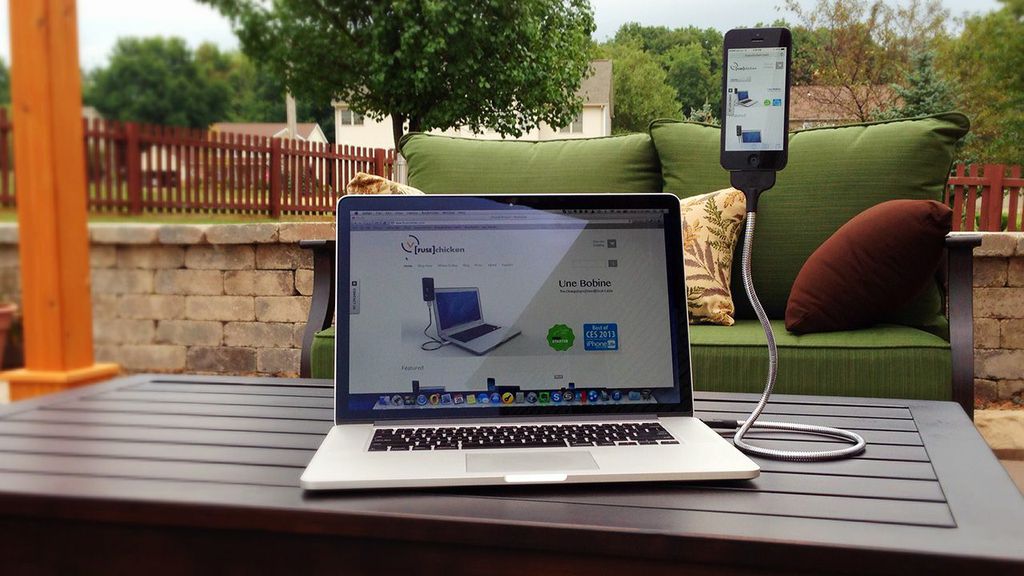
Review: Une Bobine Charging Cord for iPhone

afxxGlKWTaNm4RRAxPNZTKUpoj2s0gzpJmbi-fHqgEI

Charging cables for iPhones have always recieved a bad rap: it’s too short, it breaks too easily, or it’s a hassle to actually plug your iPhone into the charging slot – the cord is all knotted up, you have to fumble around with the Lightning connector, etc. In turn, many resort to purchasing charging docks/stations for their smartphones.

Jon Fawcett, the founder and CEO of [Fuse] Chicken, has set out to change all these negative experiences. His goal: to perfect the iPhone charging cable experience. His product: Une Bobine. [Fuse] Chicken indeed changes the charging cable industry.

Funded through Kickstarter, Une Bobine is a metallic, yet bendable Lightning-to-USB iPhone charger. Simply adjust the cable based on your viewing preference. Une Bobine is also surprisingly sturdy. It truly can hold your iPhone at almost any angle/position you want – this comes in very handy for FaceTiming (no more up-the-nose shots!), using your iPhone as an extension of your computer, shooting video, and the best part… the Une Bobine also doubles as a car mount!

DaQC1Kp1MIQzZRYRfToyfzL3BS24UYdMUQVpVZXJaFQ

The “car-mount” feature of Une Bobine is really incredible as it cradles your iPhone like a GPS-mounted system in your car… but you don’t have to have it stuck in the same place – you can move it to any position/angle that best suits your needs at the time!
Another great thing about Une Bobine is that it may also support future iPhone generations (hopefully coming out this Fall!) because of the Lightning cable technology.

Une Bobine works with most iPhone cases as well (a major plus over the official Apple iPhone 5/5S Charging Dock that doesn’t support any cases!). Note: I say it works with most cases. During my testing of Une Bobine, I found that it doesn’t support my Apple leather case-line for the iPhone 5S, much like the official Apple dock. Other than that little nitty-gritty, I found no other cons of using [Fuse] Chicken’s Une Bobine!

All in all, Une Bobine is a pretty straightforward cord that blurs the lines between iPhone charging cables and docks. Une Bobine has an unexpected, but useful feature that allows it to be doubled as a in-car GPS mount for your iPhone. You can read more about Une Bobine and purchase this neat charging cord off of [Fuse] Chicken’s website here.

Review: Touchfire Keyboard for iPad

Touchfire started out as a Kickstarter project. Kickstarter is a crowd-funding Web site that enables people to help bring promising new products to life. Touchfire ended up raising over $200,000, which is incredible!

The Touchfire keyboard is made from a high-performance silicone rubber, which makes it very easy to clean (rinse in sink), and it is very easy to store. Touchfire uses the magnets in the iPad 2, 3, & 4 to automatically align in place, and on the iPad 1, the non-slip bottom keeps it in place.

So is this new keyboard easier to type with? Can it replace the Apple Bluetooth Keyboard as your go-to keyboard for your iPad? All of these questions will be answered in my review of the Touchfire Keyboard for iPad!

—–

Quality

The materials used in Touchfire are of very high quality. In my 2 weeks of testing, the Touchfire showed no signs of scratches or tears, which is very impressive considering my iPad goes everywhere with me and I use it 24/7.

How it works

The Touchfire aligns automatically using the iPad’s magnets that are used to attach with the Apple Smart Cover. This is a brilliant feature, because you won’t have to worry about the Touchfire moving or shifting during typing as the magnets hold it in place very strongly. On the iPad 1, the Touchfire sticks on to the iPad using the non-slip button on the bottom of the Touchfire. I don’t have an iPad 1 on hand to test this with, but here’s a video from Touchfire demonstrating how this works.

Usability

Typing with the Touchfire keyboard on the iPad was a breeze. The Touchfire adds tactile feedback to the typing experience on the iPad, which makes it very much like a computer keyboard, and is definitely more easy than typing on the iPad without the Touchfire installed. With the tactile feedback of the Touchfire, I found that I was making less typing errors than normal, which saved a lot of time from having to go back and correct my mistake as I would have to do normally.

Cleaning

The Touchfire can be easily washed by running the keyboard under tap water & drying it with a towel and this is something that I found myself doing a lot of during my two weeks of testing. The Touchfire can get really dirty, very quickly. It accumulates tons of hair, dust, & other particles because of the sticky rubber keyboard. I would find myself washing the Touchfire keyboard every 2-3 days of use, which isn’t bad considering all the typing and work I had done on my iPad in the last few weeks.

Overall

Overall, the Touchfire is an excellent addition to any iPad. It allows you to type faster, decreases errors in your typing, and it is lighter & easier to travel with than a big, bulky Apple Keyboard. If you travel a lot, or write long emails, stories, or notes on your iPad and you don’t want the hassle of bringing along a bluetooth keyboard, and if you don’t mind washing the keyboard every 2-3 days, this is the product for you.

You can read more about and purchase the Touchfire Keyboard for iPad here.