
The iPad Mini – a device that has been rumored since the original iPad was announced in 2010 – is finally here. With it, comes some new features and tricks like the newly updated 7.9 inch display, Apple’s A5 chip, and the 5 megapixel back camera, to name a few.
Can this new iPad beat out the Kindle Fire HD or the Google Nexus 7?
How is the new iPad Mini compared to the iPad?
Which iPad should I get?
All of these questions will be answered and more in my review of the Apple iPad Mini.
————-
Hardware
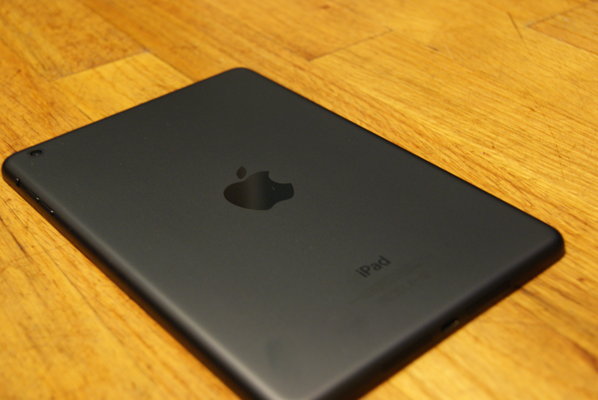
The iPad Mini is available in 2 color options, White & Silver or Black & Slate and it comes in 3 storage options: 16GB, 32GB, or 64GB. I reviewed the Black & Slate 64GB model.
The iPad Mini screams through web-browsing, playing games, & checking your emails. I experienced no lag at all, which is very impressive, especially with the new, smaller form-factor. The Apple-made A5 chip is the same processor that’s used in the iPhone 4S & iPad 2, which allows the Mini to cruise through everyday tasks, but for hard-core gamers, I would recommend checking out Apple’s new iPad with Retina Display.
The cameras on the iPad Mini are perfect for FaceTiming with friends and family, with the front-facing camera having a 1.2 MP sensor with HD video recording capabilities and the back camera having 5 MP and 1080p HD video recording. If your into taking and sharing pictures for Instagram or Facebook, it might be better to use your iPhone or smartphone as the iPad Mini’s back camera is considerably weaker than the iPhone 5’s 8 MP camera.
Apple created the iPad Mini mainly for people who are constantly on the go, plus the younger set too! The new display size is definitely more portable coming in at 7.9 inches compared to the iPad’s 9.7 inch Retina display. The iPad Mini’s display may not be “Retina” like it’s sister, the iPad, but because of the smaller display size, text & pictures look very sharp and crisp on the Mini’s display.
Software

Apple’s iOS software has kept getting better and better each year. Now with the release of iOS 6 this past fall, it is even better. iOS is all based on simplicity and functionality, while still keeping a beautiful user interface.
The iPad Mini comes with Siri, Apple’s new personal assistant, which allows you to ask anything from where to go for dinner or what the score was of the New York Jets latest game, all by talker to “her”. Sometimes Siri isn’t always on par though, and every so often she misunderstands a word or statement, but it’s easy to correct by tapping on the text that you entered and editing using the on-screen keyboard. In most of my testing however, Siri always handled my requests readily with few mistakes.
Also coming pre-loaded on the iPad Mini is FaceTime capabilities, Apple Maps, and iMessage, which adds more great features to the iPad Mini.
FaceTime is a great way to connect with friends and family using the front-facing camera. FaceTime works wherever there’s Wifi available and it uses the front and back facing cameras. Using the app is very simple, and after a few clicks, you’ll be talking with friends and loved ones in no time.
Apple Maps has received a lot of bad coverage in the media over leading users to the wrong addresses or places, but Apple has released a PR announcement saying that they know this is something to work on, and they are putting a lot of effort into making this a better feature in iOS 6. In my testing, all of my Maps navigations correctly led me to the right locations.
iMessage is another way to connect with friends and family over Wifi. You can iMessage anyone that has an iPhone, iPad, or iPod Touch, once you set up your Apple ID your good to go!
Overall

Overall, the iPad Mini is great for people on the go, or for students who need to write notes and read textbooks. The iPad Mini is super-fast, crystal-clear, and has over 275,000 iPad apps on the App Store at your fingertips. If you are a hard-core gamer or are a professional photographer who might need better graphics or the Retina Display, then I suggest looking at a regular iPad.
The iPad Mini is available from Apple.com starting at $329 USD.




 Teague Loughman