 The original MacBook Air was more of a style symbol than a computer. Yes it could fit into a manilla envelope, but the $1,799 laptop trailed behind other ultra-portables in performance, lacking USB ports or a SD slot, and packed a small and slow hard drive. For most people, there were just too many cons over pros for the high asking price.
Then came the major revision, the second Air was priced significantly less at $1,299 ($999 for the 11-inch version) and included very fast solid state drives, and added one more USB port and a SD card slot. If you didn’t need an optical drive, it had almost about everything it needed to be both a ultraportable business as well as a primary computer, but the older processors still didn’t offer quite enough performance to do the job for some people. Also, in an oversight, the keyboard wasn’t a backlit one.
Which will now bring us to Apple’s 2011 version of the 13-inch MacBook Air. The new Air now has a with a snappy dual-core Core i5 processor (with an i7 option too), a back-lit keyboard, and a new Thunderbolt port, as well as booting Apple’s brand new Mac OS X (10.7). It may look the same as the last Air, but the additions change a lot more than you’d think so. Read on after the break for my full review.
Hardware & Design
The new 13-inch MacBook Air doesn’t look any different than its predecessor – but I don’t think anyone is going to complain about that! When closed, the Air is thicker at the back of the device and tapers like a tear drop, measuring 0.11 inches at the thinnest point and 0.68 at the thickest.
The Air is still stocked with two USB ports (on opposite edges), a 3.5mm headphone jack, and an SD card reader. One big thing that the new Air is still missing is a Ethernet port to connect to the internet while traveling, but Apple offers a USB-to-Ethernet adapter for $29.
Keyboard & Touchpad
Why change something when it’s perfect, right? Well, Apple agrees with that philosophy and kept the chiclet keyboard style, added a backlight and the LaunchPad and Mission Control function keys, which took the place of the Expose and Dashboard shortcuts on the top of the computer. Bottom-line is that the new MacBook Air keyboard has it all!
It’s hard not to go on and on about Apple’s glass touchpad — it simply is the best in the business. The 4.2 x 3.0-inch pad is plenty wide for accommodating all the new multitouch gestures supported in Lion. Not to mention, the sensitivity and responsiveness is just right. Two finger “natural” scrolling, three-finger pinching to bring up LaunchPad, and horizontal swipes to move between desktops, are all effortless and don’t require that extra pressure like most of the Windows 7 laptops.
Display & speakers
There’s no change to the 13.3-inch, 1440 x 900-resolution display. It still has the amazingly wide viewing angles, and though it’s glossy, it doesn’t appear to be as distracting or mirror-y as the MacBook Pro’s display. The speakers and webcam have also been untouched. Sadly, the VGA camera hasn’t gotten the FaceTime HD upgrade, but it served up plenty clear and well-lit images when I put it to the test with some FaceTime calling and PhotoBooth pictures. The Air’s speakers are one of the best laptop speakers in the “Thin Laptop” category. Sure, it’s not going to replace your desktop speakers, but it sounds perfectly pleasant when listening to some music.
Performance
Apple claims that the new Airs pack double the performance of last-years model, and that’s not a stretch. My review unit’s 1.7GHz ultra-low voltage Core i5-2557M processor, 4GB of RAM, and a 256GB SSD showed some impressive benchmark results — even besting a handful of higher spec’d PCs because of its SSD. In actual use, it is twice as fast as the old 13-inch Air. Thanks to the Core i5 muscle and a speedy solid-state drive, apps open almost instantaneously and running multiple applications doesn’t cause any lag. The laptop also boots in a quick 18 seconds.
The entire OS just purrs along and all those worries I once had about using an Air as my primary system have gone away in the past two days of heavy use. There’s no doubt this Air could easily replace my current Core 2 Duo MacBook Pro.
Battery life & Software
When I first saw the benchmarks and felt how much faster the Air was in everyday use, I was worried about the impact on battery life. However, my worries were put to rest. Apple’s 50Wh battery lasts just as long as it did before. I could easily get a day’s usage out of the computer without any need for rushing to go get my charger on an outlet.
The MacBook Airs are the first laptops to be sold with Apple’s new OS X 10.7. I’m not going to get into the software here, but the iOS-influenced operating system seems likes it was built exactly for a system like the Air. As I’ve mentioned above, the new gestures work like a charm and the solid state drives have things speeding along very quickly. I love the new “Natural” Scrolling and the new Mission Control as it gives me a better layout as to what I have open and running on my computer. I’ll also give props to the new Safari, which looks awesome in full screen mode, and the new mail app, which pulls on a lot of the iPad’s UI.
Conclusion
You will be forgiven for thinking that this new MacBook Air isn’t all that it has hyped up to be. It is much more than that! Sure, if you look at it on paper; Apple has only added Lion, a new processor, and a ThunderBolt port. In reality, it’s much more than that: it’s the first Air that’s capable enough to replace not only the old white MacBook but also the MacBook Pro for some mainstream users. The new processors are fast enough for almost any day-to-day task, and the Thunderbolt port allows the system to expand to almost full desktop strength using just a single cable. Oh, and Apple added the backlit keyboard back in.
One thing is clear: you can no longer write off the Air as merely a status symbol or secondary system. This is a grown-up laptop with the kind of horsepower and battery life that will make a lot of users very happy. And yes, it still fits in a manila envelope!
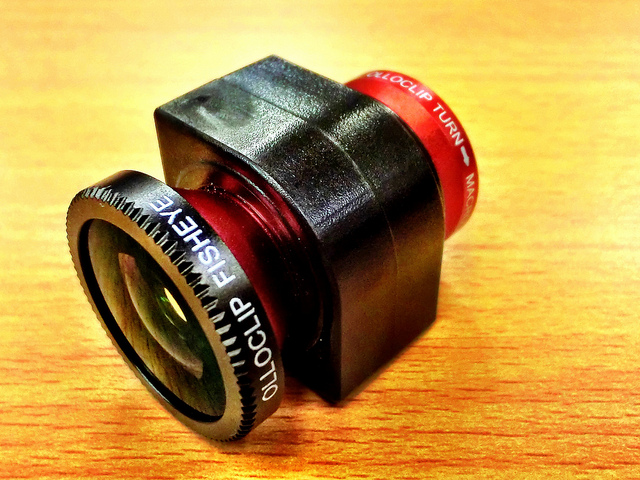
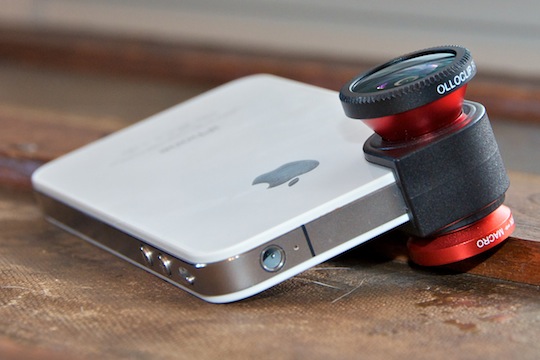 Designed by a startup duo in California, the Olloclip was a project successfully funded by Kickstarter.com. The accessory brings the functionality of three lenses to your iPhone 4 or 4S, macro, fish-eye, and wide-angle, and it almost does that well enough for you to leave the professional equipment at home! I had a blast shooting with the Olloclip, and I think you will too. Read on in my review of the Olloclip to find out why!










 Teague Loughman