Olloclip for iPhone 6 Review

When Apple announced their newest line of iPhones, like many other people, I was extremely excited – finally some new iPhones! Not only was I excited about the iPhones as “phones”, but also I was really excited about the new camera upgrades for both iPhones – the iPhone 6 and 6 Plus.

The new camera upgrades in the iPhone 6/Plus boast some pretty remarkable features. Here’s a short list:

  • Focus Pixels: new sensors in the iPhone’s 8MP camera for faster auto-focus
  • Improved face detection: group pictures and portraits are a whole better with faster, and more accurate face detection focus
  • Auto image stabilization: helps get rid of motion blur and hand shakiness by taking four rapid-fire pictures with a short exposure time, then combining them all together into one awesome selfie.

There’s only one thing that wasn’t added to the awesome new iPhones’ cameras: a macro lens! And that’s where Olloclip knocks it out of the park!

Olloclip’s 4-in-1 system slips right onto the top of your iPhone 6, 6 Plus, or even your iPad. It has extremely versatile modular lenses that give you the option of 10x macro, 15x macro, fisheye, and even wide-angle photography.

The Olloclip is incredibly easy to use, and swapping between the four different lenses is extremely fast – with just a quick unscrew and flip, you can go from macro to fisheye in under 10 seconds!

Thanks to Olloclip, taking pictures on your iPhone has never been so fun!

My two favorite lenses are definitely the wide-angle and fisheye lenses. If you are traveling and taking pictures of tall buildings and monuments, the wide-angle lens is particulary helpful to try and capture as much as possible in the frame. On the otherhand, the fisheye lens makes your sunset or close-up pictures even cooler!

But hey, don’t just take my word for it! Check out some of the pictures I took while testing the Olloclip on my iPhone 6 Plus:

And if you’re looking for some truly awesome photos, from actual professional photographers (and not just from a seventeen year-old with an iPhone!), I have included some pictures taken with the Olloclip courtesy of Olloclip’s website:

The Olloclip 4-in-1 lens system is perfect for photog-junkies, as well as everyday people, like me, who like to take beautiful and unique pictures with their iPhones.

At just $69.99, the Olloclip is the perfect gift for that Instagram-obsessed person on your list this holiday season.

You can find out more about and purchase the Olloclip 4-in-1 lens system on Olloclip’s website.

Apple’s iPhone 6 Plus: First Impressions

iPhone 6 Plus

I received my white iPhone 6 Plus via UPS late Friday afternoon. After signing ‘here, here, and also here’ for the Plus, I greedily ripped off the simple, yet elegant packaging much like a small child on Christmas morning.

During the Apple Keynote on September 14th, CEO Tim Cook announced that the iPhone 6 and 6 Plus were revolutionary devices like you’ve never seen before, and man was he right! As soon as I held the 6 Plus in my hand, I knew that this was going to be Apple’s Android-killing smartphone.

The iPhone 6 Plus is super speedy (read, scary fast) with the new A8 processor, very responsive, and very, very big. To be honest, I am trying still getting used to the new, huge size. When comparing the 6 Plus to my old iPhone 5S, it’s like comparing Dwayne “The Rock” Johnson to “Mini-Me” in Austin Powers — it’s just that big!

But you know what makes the size even better? 😉 The new Retina HD display! Scrolling down my Instagram feed has never been more beautiful! Black and whites are sharp, colors are saturated perfectly and everything is vivid and super, easy-to-read clear. (My mom tried using it for 5 minutes and didn’t even need her reading glasses!)

One little thing that annoys me, however, is that some App Developers have not yet updated their applications for the iPhone 6 and 6 Plus’ new, larger displays – UGGH! This causes some apps to look pixellated, or it makes menus and text larger than needed to be (much like the 2x zoom button when opening iPhone applications on iPads).

I haven’t really put the 6 Plus’ camera through its paces quite yet, but I am planning on going to the beach sometime this week to test it out. (Follow my Instagram for these pictures!)

The iPhone 6 Plus is major contender for best smartphone on the market, if not the only one! The bigger and clearer screen, faster processor, and at first impression better camera,  all together really exemplify Apple’s ability to read the market’s needs and develop a smartphone that people will really want to use and buy!

Stay tuned for my full review of the iPhone 6 Plus and iPhone 6 coming soon.

2014 WWDC Event Recap: What You Need To Know

On June 2nd, 2014, Apple held it’s 25th annual Worldwide Developer Conference in lovely San Francisco, California. During the 10:00 AM keynote, Tim Cook took the stage to announce the newest software versions for Mac and iOS: OS X Yosemite and iOS 8, respectively.

Mac

At the Keynote, Apple’s SVP of Software Engineering Craig Federighi, announced the features of their newest Mac software, OS X Yosemite. Yosemite is one of the biggest software updates in the history of Macs – with a new, clean design (resembles iOS 7), updates to Notification Center (app widgets – yay!), iCloud Drive, as well as improvements to Mail, Safari, Spotlight, and more.

With a public beta coming sometime this summer, and a shipping date set for Fall, OS X Yosemite is sure to be a big hit! Apple has added many highly-requested features to their newest operating system, such as AirDrop between iOS and Mac (finally!), and the ability to receive/send phone calls and text messages from your Mac, which is connected via iPhone – pretty impressive!

My favorite features of the new update are the translucent app-windows, a “dark mode” feature that dims toolbars to focus on your work, as well as the new Spotlight search, which now basically lets you search for everything and anything on your Mac, Internet, iTunes, and beyond – extremely cool and future-esque!

iOS

Apple also announced the newest version of operating system for their iPod, iPad, and iPhone line of devices, iOS 8. As with OS X Yosemite, Apple really listened to what the people want – even adding some features previously only available through the jailbreak community as well!

iOS 8 big highlight additions include: * Interactive notifications (quick pull down of the banner) * Better Spotlight search * Group Message improvements and the abilities to add/delete members * An updated keyboard with predictive text capabilities dubbed QuickType * A much-rumored Health app * The ability to password protect certain apps like Photos or Messages * And much, much more!

In an interesting twist, Tim Cook also announced that the iOS 8 software would be more open to developers. Cook even added the option of using a third-party keyboard instead of the regular Apple Keyboard – which is something that’s been on many developers’ wishlist for years!

Other Announcements

Tim Cook reiterated “Continuity” – a new feature that is a part of both iOS 8 and OSX Yosemite. Continuity blurs the lines between phones, laptops, iPads, and desktops. One of the two main features of Continuity is an improved AirDrop which finally allows users to transfer photos and documents between iOS and Mac devices. The second main feature of Continuity adds a “Handoff” feature, which through Wifi/Bluetooth, your computer and iOS device exchange program information in real time. For example: lets say you start to draft an email on your iPad, but then quickly realize that it’s longer than expected, and you would rather write it on your Mac. Now with Handoff, there’s no need to worry about accidentally deleting all of your email text or saving it as a draft and having to wait for your computer to sync. Handoff, with with just a tap of a button, simply allows you to pick up right where you left off on your iPad, on your Mac! Three words: brilliance, speed, and efficiency.

Overall

Overall, WWDC 2014 brought HUGE Apple announcements, and it certainly was a big day for Tim Cook & Team! If you want to read more about Mac OS X Yosemite, Apple has dedicated a page specifically for it here. Additionally, here is the page with more information about iOS 8.

Also, be sure to keep checking back to TeagueLoughman.com for my official review of iOS 8 in the coming weeks!

Pre-WWDC: What You Should Do


wwdc14-home-branding

Tomorrow’s the big day – Apple’s Worldwide Developer Conference kicks off tomorrow (June 2nd) in beautiful San Francisco!

Apple has a Keynote planned for 10AM Pacific time tomorrow morning, and in it they are rumored to be announcing the latest version of their iOS software, iOS 8, which will officially ship sometime this fall.

If you want to get your hands on iOS 8 early, you need to register your iPhone’s UDID through a developer’s account so your iPhone doesn’t become bricked or unusable.

In my opinion, the best website to do this is iOSReg. To register your UDID, it is just $3.99 and you will have an email confirmation and your iPhone registered in under 1 minute — which is the fastest UDID register-time available on the internet! Here is the full link: www.iosreg.com

If you need any help registering your iDevice or have any predictions or comments about the WWDC Keynote tomorrow morning, make sure to drop your comments below!

Also, look for another post coming later this week with a full iOS 8 walkthrough!


Review: Checkmark 2 for iPhone

Checkmark 2 - Lists

The original Checkmark to-do list application for iPhone was a stellar app. Now, with the newly released Checkmark 2 by Snowman, an already powerful to-do list manager, has now become even more of a productivity powerhouse.

The new Checkmark 2 adds a slew of new useful features, including, but not limited to: the popularly requested “List” view; one tap rescheduling of tasks; and iCloud support.

“List view” allows for multiple tasks to be grouped together under one common category – which is really helpful for projects (school, business, etc), as well as for simple lists (new movies or food to try).

One-tap rescheduling is also a new feature that is included in the new Checkmark 2, which makes it super easy to push a due date ahead by minutes, hours, or days in one simple tap!

iCloud support is another popularly-requested feature added in Checkmark 2. This feature may not seem that important now, however after you use Checkmark 2 and create multiple to-dos, lists, locations, etc, you would hate to have all that data be lost if something were to happen to your iPhone. That’s where the iCloud backup comes in and it will automatically sync and backup all of your data.

The design of Checkmark 2 truly envisions and adopts the wonderful, flat elements of iOS 7, yet adds it’s own unique style too! The cool shades of green, grey, paired with the white backdrop typical in iOS 7, really come together quite well to create a totally eye-alluring application, that is as beautiful to look at as it is fun to use.

Checkmark 2 (Light)

When it all comes down to it, a to-do list application really needs to do one thing quite well: create tasks quickly and efficiently. I must say that Checkmark 2 excels in this realm.

In Checkmark 2, you create tasks to three different categories: location-based, time-based, or as a list. For me, the location-based task ability is really useful.

For instance, when I am out and about and see an advertisement for a new movie that is coming out, I can quickly add a task in Checkmark 2 to remind me when I get home to look up showing times for this new movie – pretty handy stuff!

Organizing tasks into Lists is also a great way to break down those big, hefty projects into smaller, more obtainable goals!

One thing that I think is lacking in Checkmark 2 is syncing with Apple’s built-in Reminders app. What this does is it syncs the Reminders app tasks with the tasks you have already created in Checkmark 2. This allows you to make changes or add tasks from the Reminders app on your Mac, and then have it synced to your iPhone via the iCloud.

Checkmark 2 - Where

Overall, Checkmark 2 is an uber-smart, task productivity manager for your iPhone all in one clean, simple app, and for just the price of a cup of coffee ($2.99)! Checkmark 2 has already helped save me time and money, just by making my life more organized.

You can read more about and purchase Checkmark 2 from the Snowman’s website, or the through the App Store.

Review: nimblestand Dock for iPad

photo 2

While the tablet dock/keyboard market seems already overpopulated, nimblestand For iPad should undoubtedly find it’s rightful place as the new “favorite”! Co-founders Gustavo Fontana and Matt Esecson have developed a great, portable dock/keyboard with superb functionalism. Nimblestand has arrived!

Nimblestand is both a tablet stand and a keyboard dock, with special thanks to a brilliant design. The stand/dock is manufactured using a very resilient, yet rigid black plastic – which makes nimblestand an excellent choice if you are always on the go, you can just throw it into your bag or briefcase without worrying about the dock being damaged.

The nimblestand’s direct hit is also it’s compatibly with the Apple Bluetooth Keyboard (one of the most popular Bluetooth keyboards available today). The ingenious design of the nimblestand allows the Apple Keyboard to be slid into the nimblestand, which converts the device from a simple tablet stand, to a fully-packed keyboard-stand duo.

photo 3

iPad + keyboard = pseudo-laptop!

I tested the nimblestand with a variety of tablets all with different form factors and every single tablet that I used with the nimblestand fit perfectly snug and is a joy to use. One of my favorite features of the nimblestand the compatibility with the Apple Bluetooth Keyboard (my favorite keyboard), as well as the fact that it comes with a beautiful stylus too! The keyboard compatibility is a real “plus” for me as it saves me a lot of frustration (from misspellings) and time (increased typing speed via keyboard).

Another great feature of the nimblestand is a patented stylus storage slot, which is a great “add on” for the Wacom Stylus – a gorgeous, all wood, bamboo stylus that is included with your Nimblestand purchase.

All in all, I would highly recommend the nimblestand for it’s wide variety of uses as well as the incredible quality used in the product. Additionally, I would recommend adding the wonderful Wacom Stylus as it, plus the nimblestand, truly are an unparalleled pair.

photo 1

For more information about the nimblestand and the Wacom Bamboo Stylus, you can read more about it on nimblestand’s website. The nimblestand itself is priced at $39.99, while the nimblestand & Stylus combo is available for $56.99.


Scantastic for iPhone Review

imageScantastic is an exciting, new addition to a long line to the Scanner-Apps-for-iPhone World. Recently released to the App Store on December 24th, Scantastic is a clean, super-fast, user friendly iPhone application that allows for simple one-tap scanning of all your receipts, documents, essays, you name it — Scantastic will scan it. 

Scantastic is feature-packed with several different useful “tweaks”:

  1. simply tap the gorgeously designed app icon
  2. scan your document in less than 2 seconds!
  3. “threshold filtering” transforms your document into a simple, clean, black and white PDF. This is my favorite feature of Scantastic, as it makes your document look professionally scanned.
  4. After scanning, you simply shoot your new PDF off in a quick email or share it on social media, etc.

scantasitc-inhand-double-sw

The effort and design that went into creating Scantastic is truly incredible! All of the text and font choices are clear and easily readable! The dark/bright colors are very eye-alluring! As you can see from the screenshots, the UI is simply spectacular.

The design is almost so iOS 7 it feels iOS 8!

scantastic-iphone5-EN-2

Scantastic truly has all the bells & whistles. It will go above and beyond all your scanning needs – and what’s the best part? It’s all in your pocket! Scantastic is a powerful tool for global students and online classroom demands, as well as today’s business professional.

I strongly recommend reading more about and purchasing Scantastic for $1.99 on the Apple App Store.

Review: NOMAD’s ChargeCard & ChargeKey

photo 1

In the ever-evolving, technology-run world that we live in today, running out of battery is a big worry for most people. But fear no more, NOMAD has got you covered.

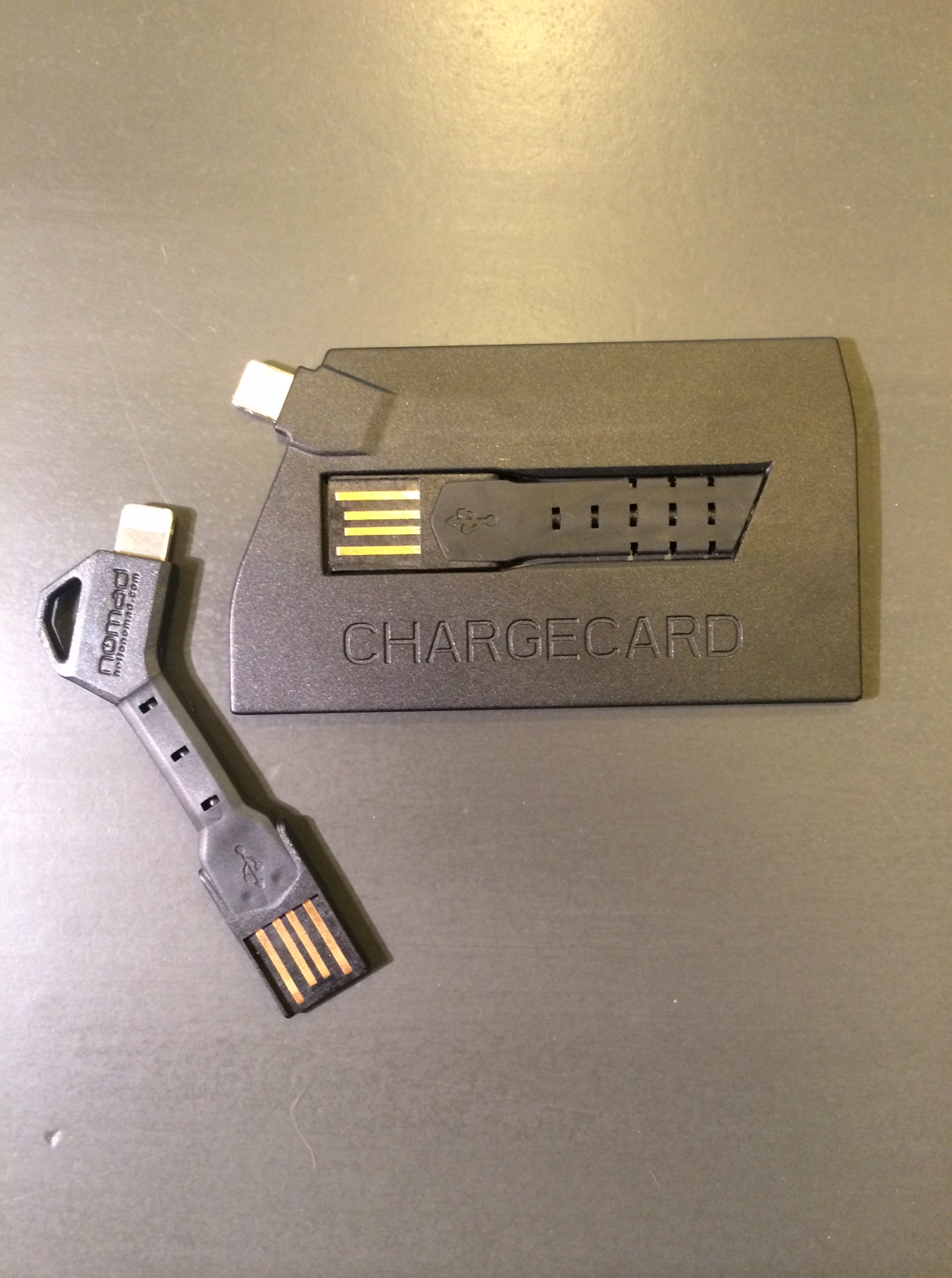
NOMAD Goods recently announced their two new products, the ChargeCard & ChargeKey. Both of which are super small USB chargers that will make sure you are never without a charging cord for your smartphone or tablet.

photo 4

The ChargeCard is a credit card-inspired USB charger that is thin enough to fit inside your wallet. The ingenious slide-out-USB design allows for easy access to a charging cord no matter where you are.

The ChargeKey, being the most recent addition to the NOMAD line of products, is shaped exactly how you would picture it, like a key. The key-inspired design can conveniently attach to a key ring, which makes the ChargeKey ultra-portable, coming in at just 2.5 inches long. Another key feature of the ChargeKey is it’s ability to effortlessly bend up or down to fit any charging position’s needs.

photo 2

One thing that I felt was lacking when using the ChargeCard or ChargeKey to charge your smartphone, it is very awkward and nearly unable to use the phone while plugged in due to the compact design of the ChargeCard/ChargeKey. Perhaps this will be fixed in the coming versions by adding a cord that can extend to allow for more comfortable usability while charging.

Overall, both the ChargeKey and the ChargeCard are terrifically designed and innovated accessories that change the way you think about and charge your phone. I found myself not even needing to bring charging cables on long trips, as I just used ChargeCard or ChargeKey whenever I needed to, wherever I needed to.

photo 3

Just coming in at $25 for each, the ChargeCard or ChargeKey will perfectly compliment your iPhone or other USB-enabled smartphone. You can read more about and also purchase the ChargeCard or ChargeKey at NOMAD’s website here.

Review: Lunatik Flack Jacket for iPad Mini

Flak Jacket

Whenever I go on trips, whether it be all the way across the country or to the grocery store, I always bring my iPad Mini. If you are a person that brings their Apple tablet everywhere, then you have already have a jacket or cover… but now you may want to take a hard look at your previous purchases because Lunatik has just introduced a great new productive iPad Mini sleeve, The Lunatik Flak Jacket.

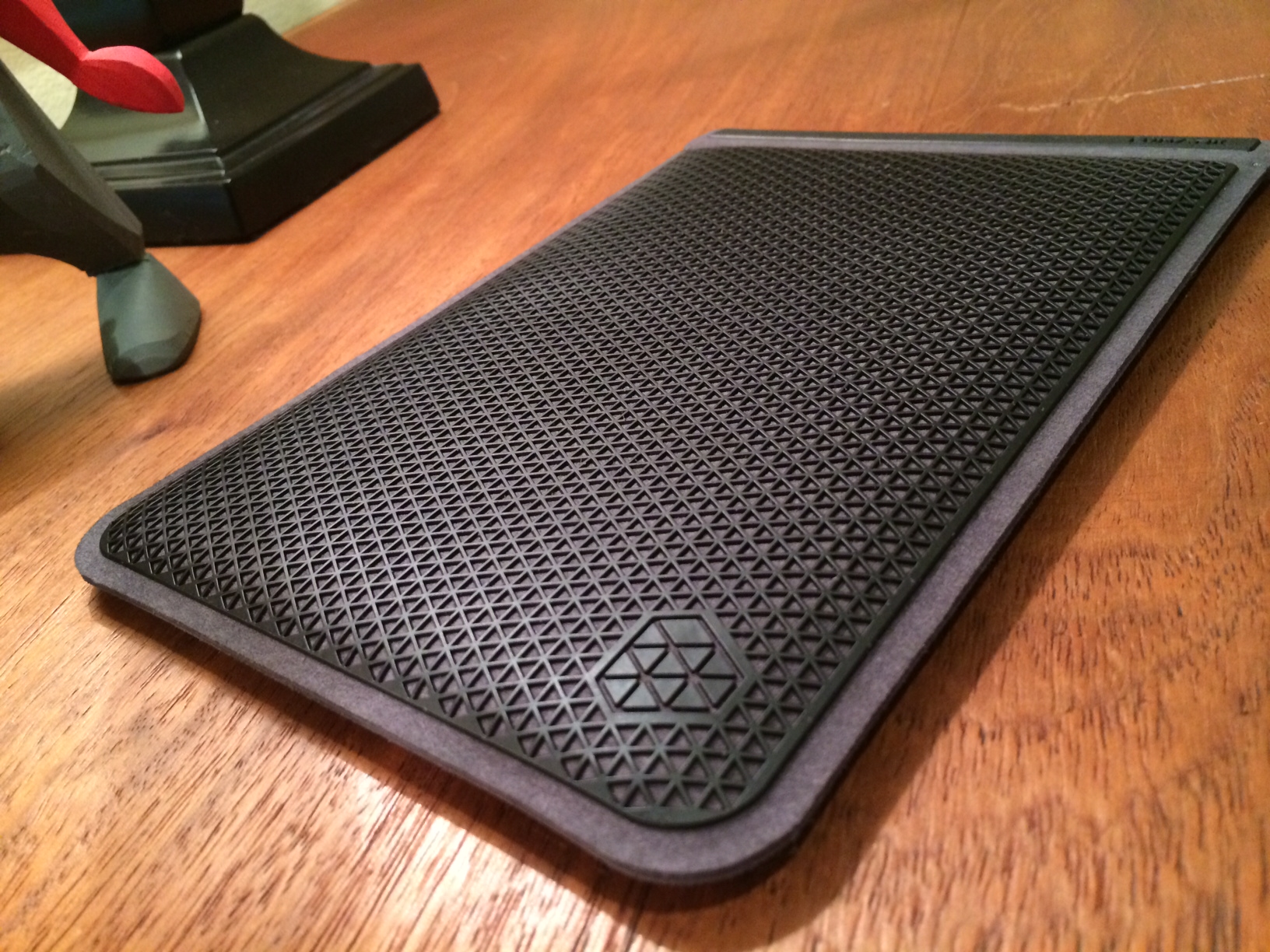
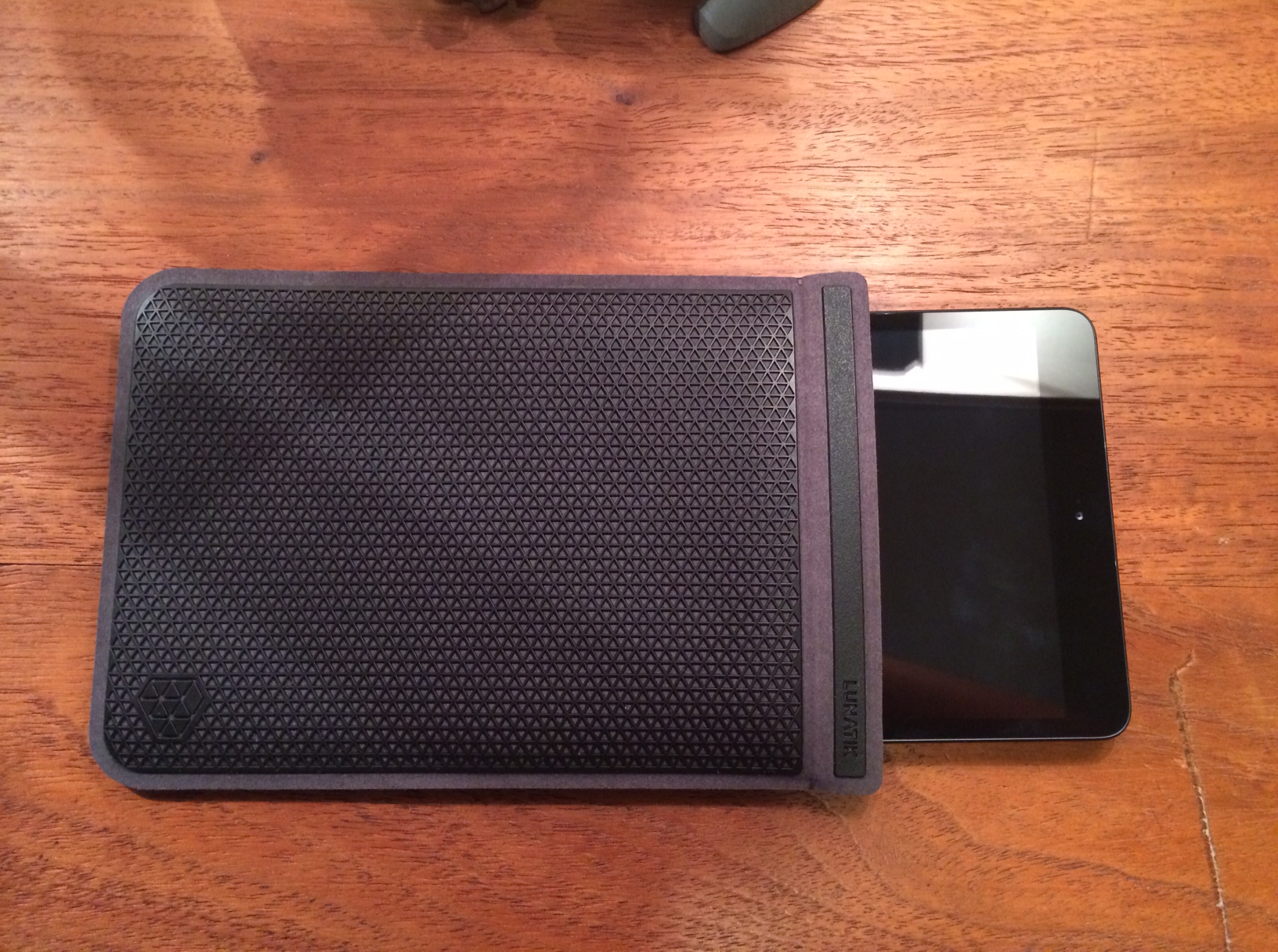
The Flak Jacket is a lightweight sleeve for iPad Mini that is made out of a protective three-dimensional polyurethane, that is commonly used in footwear and performance outerwear. It is available in three different colors – dark black, cool mint, or bright pink. The Flak Jacket is extremely well-designed to provide top-notch protection against impact and abrasion resistance. Inside the Flak Jacket sleeve, microfiber lines the interior which cradles the iPad Mini with a super soft, snug fit.

My favorite thing about the Flak Jacket sleeve for iPad Mini is not only the protection it adds, but that it allows me to use my iPad naked (without a case), yet still offer me protection when transporting my device. This way, I can fully enjoy my iPad and it’s incredible design as Apple intended.

photo 3

Another thing that makes the Flak Jacket special is the neat addition of a magnet, which allows for an easy open/close and is definitely an upgrade over other cases which use velcro or elastics. Also, the Flak Jacket is iPad Smart Cover friendly – which means that there is no need for you to take your Apple Smart Cover off your Mini when putting it in the Flak Jacket, the Mini, Smart Cover-and-all will fit into the sleeve no problem.

All in all, the Flak Jacket, in my opinion, is one of the best cases for the iPad Mini I have seen so far and it would make a perfect holiday gift for you or a loved one coming in at just $49. The durable and hard, yet flexible, outside paired with soft and cushiony inside protect your iPad Mini without any added bulk.

lunatik_original_slideshow_960x540_ia_131004_FLAKJACKIT__Detailshot2_black.slide

The Lunatik Flak Jacket also fits perfectly for the Kindle Fire HD/X, Nexus 7, Nook HD, as well as the Galaxy Tab 2 & 3.

You can read more about and purchase the Flak Jacket for iPad Mini on Lunatik’s website.

October 2013 Apple Event Round-Up

apple-lots-to-cover

On Tuesday, October 22nd, 2013 in San Francisco, California, Apple held a media event to discuss their new and innovative line of MacBooks and iPads, and boy did they deliver!

During this new event, Apple announced several new products, such as Mac OSX 10 (Mavericks), a newly updated iLife & iWork suite of apps, as well as a new Mac Pro, and the brand new iPad Air, which is the latest & greatest in the iPad family of tablets.

Mac OSX 10 – Mavericks

OSX-multiple_displays_missioncontrol

Apple introduced their newest Mac software, Mavericks. This announcement really raised the competition stakes against Microsoft, as this update would be free to all Mac users, something Apple has never done before!

Among the various improvements in UI and speed, OSX 10 increases power efficiency, which allows for a longer lasting battery to allow for more surfing the web, responding to emails, or movie watching. Another improvement over Lion is the upgraded notification system which allows users to respond directly from the notification itself, which I find extremely easy to use and definitely beats going in the app itself just to respond to a tweet or email.

My favorite new feature of Mavericks is the introduction of Finder Tags, which allows for easier and quicker finding of files, documents, photos, and movies. You can create your own tags and easily tag any document or file you like by using a two-finger on your Mac trackpad, and selecting a Tag, so all of your School or Work related files are all in one organized location on your Mac.

In addition, coming preloaded on Mavericks are two new apps, Maps and iBooks. Maps is basically  the same as it is on iOS 7, however you do have the ability to send directions from your computer to your iPhone/iPad as a push notification, which is a really convenient feature! The introduction of iBooks on the Mac is excellent for textbooks or note-taking, however I still prefer to read books on the iPad over the Mac as it is more comfortable to hold, as well as the animations of the page swiping too!

Mac OSX 10 Mavericks is available today as a free update on all Macs. To download it, simply go into the Mac App Store and click ‘Check for Updates’.

Macbook

Macbook-Pro-Featured-Image

In the Macbook line of products, Apple announced three new members to the Mac family: the 13 inch Macbook Pro with Retina Display, the 15 inch Macbook Pro with Retina Display, as well as the new Mac Pro.

The 13 and 15 inch Macbook Pro are shipping with the beautiful, crystal-clear Retina Display, as well as some new upgrades internally, such as an improved battery (9 hours of battery life), 802.11c wifi (3x as fast as the previous versions), as well as an Intel 4th gen. Haswell chip. The new Macbook Pro’s come in at an unbelievable 0.71 inches thick, which is the lightest the Macbook Pro ever!

Apple also launched the new donut-shaped Mac Pro, which has the fastest chip, memory and graphic technology from Apple.

The Macbook Pro(s) are available on Apple’s website now starting at $1,499 for the 13-inch and $1,999 for the 15-inch. The new Mac Pro will be available by year’s end, starting at $2,999.

iPad

retina-ipad-mini-ipad-air

The main reason for this media event: the latest innovations to iPad. Apple announced two new versions to the iPad family: the new iPad Air and the iPad Mini with Retina Display.

On Tuesday, October 22nd, 2013 in San Francisco, California, Apple held a media event to discuss their new and innovative line of MacBooks and iPads, and boy did they deliver!

During this new event, Apple announced several new products, such as Mac OSX 10 (Mavericks), a newly updated iLife & iWork suite of apps, as well as a new Mac Pro, and the brand new iPad Air, which is the latest & greatest in the iPad family of tablets.

Overview

This media event was huge for Apple! Announcing their brand new Mac OSX, three new Macs, as well as updating their iLife & iWork suite of apps, and perhaps most overdue, two super upgrades to the iPad family.

You can read more about all of the details of the Apple event and watch the Keynote video on Apple’s website.