Olloclip for iPhone 6 Review

When Apple announced their newest line of iPhones, like many other people, I was extremely excited – finally some new iPhones! Not only was I excited about the iPhones as “phones”, but also I was really excited about the new camera upgrades for both iPhones – the iPhone 6 and 6 Plus.

The new camera upgrades in the iPhone 6/Plus boast some pretty remarkable features. Here’s a short list:

  • Focus Pixels: new sensors in the iPhone’s 8MP camera for faster auto-focus
  • Improved face detection: group pictures and portraits are a whole better with faster, and more accurate face detection focus
  • Auto image stabilization: helps get rid of motion blur and hand shakiness by taking four rapid-fire pictures with a short exposure time, then combining them all together into one awesome selfie.

There’s only one thing that wasn’t added to the awesome new iPhones’ cameras: a macro lens! And that’s where Olloclip knocks it out of the park!

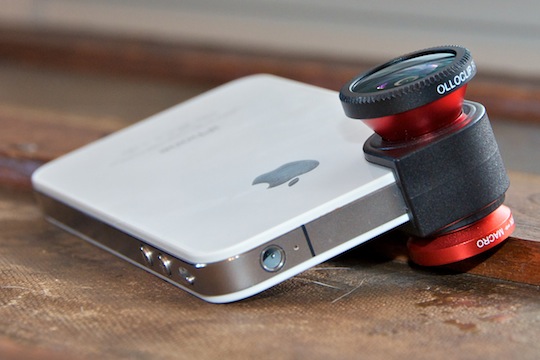
Olloclip’s 4-in-1 system slips right onto the top of your iPhone 6, 6 Plus, or even your iPad. It has extremely versatile modular lenses that give you the option of 10x macro, 15x macro, fisheye, and even wide-angle photography.

The Olloclip is incredibly easy to use, and swapping between the four different lenses is extremely fast – with just a quick unscrew and flip, you can go from macro to fisheye in under 10 seconds!

Thanks to Olloclip, taking pictures on your iPhone has never been so fun!

My two favorite lenses are definitely the wide-angle and fisheye lenses. If you are traveling and taking pictures of tall buildings and monuments, the wide-angle lens is particulary helpful to try and capture as much as possible in the frame. On the otherhand, the fisheye lens makes your sunset or close-up pictures even cooler!

But hey, don’t just take my word for it! Check out some of the pictures I took while testing the Olloclip on my iPhone 6 Plus:

And if you’re looking for some truly awesome photos, from actual professional photographers (and not just from a seventeen year-old with an iPhone!), I have included some pictures taken with the Olloclip courtesy of Olloclip’s website:

The Olloclip 4-in-1 lens system is perfect for photog-junkies, as well as everyday people, like me, who like to take beautiful and unique pictures with their iPhones.

At just $69.99, the Olloclip is the perfect gift for that Instagram-obsessed person on your list this holiday season.

You can find out more about and purchase the Olloclip 4-in-1 lens system on Olloclip’s website.

Apple’s iPhone 6 Plus: First Impressions

iPhone 6 Plus

I received my white iPhone 6 Plus via UPS late Friday afternoon. After signing ‘here, here, and also here’ for the Plus, I greedily ripped off the simple, yet elegant packaging much like a small child on Christmas morning.

During the Apple Keynote on September 14th, CEO Tim Cook announced that the iPhone 6 and 6 Plus were revolutionary devices like you’ve never seen before, and man was he right! As soon as I held the 6 Plus in my hand, I knew that this was going to be Apple’s Android-killing smartphone.

The iPhone 6 Plus is super speedy (read, scary fast) with the new A8 processor, very responsive, and very, very big. To be honest, I am trying still getting used to the new, huge size. When comparing the 6 Plus to my old iPhone 5S, it’s like comparing Dwayne “The Rock” Johnson to “Mini-Me” in Austin Powers — it’s just that big!

But you know what makes the size even better? 😉 The new Retina HD display! Scrolling down my Instagram feed has never been more beautiful! Black and whites are sharp, colors are saturated perfectly and everything is vivid and super, easy-to-read clear. (My mom tried using it for 5 minutes and didn’t even need her reading glasses!)

One little thing that annoys me, however, is that some App Developers have not yet updated their applications for the iPhone 6 and 6 Plus’ new, larger displays – UGGH! This causes some apps to look pixellated, or it makes menus and text larger than needed to be (much like the 2x zoom button when opening iPhone applications on iPads).

I haven’t really put the 6 Plus’ camera through its paces quite yet, but I am planning on going to the beach sometime this week to test it out. (Follow my Instagram for these pictures!)

The iPhone 6 Plus is major contender for best smartphone on the market, if not the only one! The bigger and clearer screen, faster processor, and at first impression better camera,  all together really exemplify Apple’s ability to read the market’s needs and develop a smartphone that people will really want to use and buy!

Stay tuned for my full review of the iPhone 6 Plus and iPhone 6 coming soon.

Quick Review: Motorola Xyboard 10.1

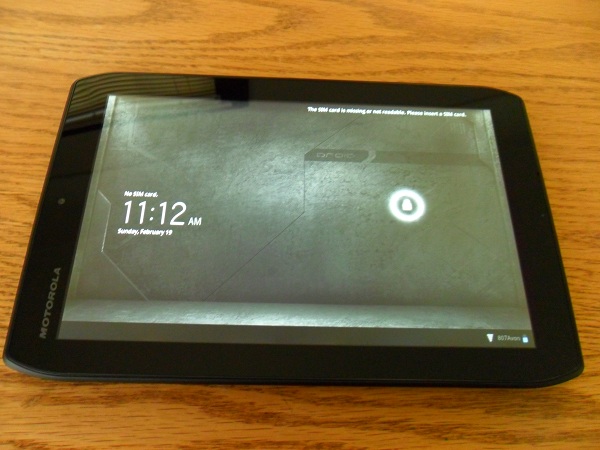
The new Droid Xyboard is a beast of a tablet. Motorola’s newest tablet runs on Verizon’s super-fast 4G LTE Network, it runs on Android’s 3.2 Honeycomb (4.0 Ice Cream Sandwich Upgradeable), as well as having two cameras; 5 megapixel on the back with a HD Webcam on the front, and a huge 7,000 mAh battery. All that said, can it compete with Apple’s third-generation iPad? Keep on reading for my review of the Droid Xyboard 10.1 running on Verizon’s 4G LTE Network.

Highlights

  • Verizon  – Verizon’s 4G Network is easily the fastest LTE network in the United States. In my testing around the Dallas Area, the Xyboard never dropped below 2 bars of LTE. I consistently received download speeds of around 19 MB/s and an upload speed 10 MB/s.
  • Display – The display on the Xyboard 10.1 is another high point, responding to touch input quickly and loading websites, apps and videos sharply, clearly and brightly. Unlike the iPad or the Galaxy Tab 10.1, the Xyboard has a mini-HDMI port built-in, which makes it easy to hook the tablet up to a TV set.
  • Camera – The 5.0 MP back-camera on the Droid Xyboard 10.1 is one of the best cameras on a tablet to date. The addition of the LED Flash is what makes the Xyboard’s camera stand out. Lowlight pictures were perfect – never overexposed nor too bright.
  • Software / Specs – On other devices, Android 3.2 Honeycomb always seemed to be very slow and laggy, but with the help of the dual-core 1.2 GHZ processor, the Xyboard flew through webpages, emails, apps, and homescreens. I never had an app force-quit or crash while using the Xyboard 10.1, and I credit that to Motorola by putting great specs into the Xyboard to get the most out of Honeycomb.

Lowlights

  • Size – Holding the Droid Xyboard 10.1 in landscape orientation is just fine, but when switching it over to portrait it felt awkward to hold and touch the screen. When using the iPad, the transition from landscape to portrait is seemless, but on the Xyboard it feels more like a liability.
  • Software – Honeycomb is a lowlight and a highlight of the Droid Xyboard. While it runs very fast, the User Interface is very clunky and not easily learned by all people.

Overall


This is THE best Android Tablet, no doubt about it! Great display, amazing camera, super-fast processor, and running on Verizon’s 4G LTE Network, the Droid Xyboard absolutely smokes the other Android Competition and in some ways, even the Apple iPad.

I would recommend the Droid Xyboard 10.1 for Android enthusiasts, business people, or teachers. But if you are a first-time smartphone or tablet user, I would recommend checking out something else. You can read more about and purchase the Motorola Xyboard here.

Review: Olloclip lens for iPhone

Designed by a startup duo in California, the Olloclip was a project successfully funded by Kickstarter.com. The accessory brings the functionality of three lenses to your iPhone 4 or 4S, macro, fish-eye, and wide-angle, and it almost does that well enough for you to leave the professional equipment at home! I had a blast shooting with the Olloclip, and I think you will too. Read on in my review of the Olloclip to find out why!

Usability

The Olloclip is very easy to use. You don’t need to install any software, though it’s compatible with any and all iPhone apps. And mounting or swapping lenses just takes a second. I also want to point out that using the wide-angle lens for shooting video was a completely different experience than without the lens. When shooting video, you can definitely see what you’re missing when shooting without the Olloclip. (See video and image samples below)

Appearance

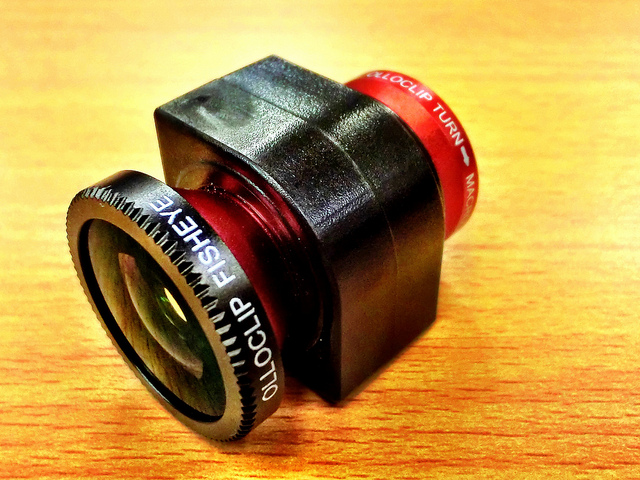
At first glance, the Olloclip only appears to include two lenses, but unscrewing the wide-angle reveals the cleverly hidden macro lens. To use any of the built-in lenses, simply slide the Olloclip over the iPhone’s camera. The Olloclip fits quite snug, so you can rotate the phone, walk around, and even slip your phone into a bag without worrying about the lens slipping off. It’s also easy to reposition — to swap the wide-angle for the fisheye, for example, just flip the entire clip around so that the lens you want to use is facing forward.

The Olloclip comes with lens caps for both primary lenses, and a small carrying pouch that also doubles as a microfiber cleaning cloth. The device is available with either black or red barrels – both constructed from high-quality aluminum. The multi-element lenses are constructed of precision-ground glass, and that’s clearly reflected in the image quality I was able to achieve.

Image Quality
Pictures I shot with all three lenses were sharp and vibrant, and very distinctive from those captured with the iPhone’s native lens. Some pictures had barrel distortions, but for the fish-eye lens, that’s the point right?

I was most impressed with the macro lens, which basically functions as a powerful magnifying glass for your iPhone. I was able to capture incredible detail with this lens. This point alone is enough to justify the expense of adding the Olloclip!

Sample Pictures

Overall

Overall, the Olloclip gives the iPhone’s camera a much-needed lift with three filters and fun effects. I’d especially recommend it for both professional and novice photographers who love adding effects to their photos while keep the quality of their images very high. You can read more about and purchase the Olloclip here.