
The new Droid Xyboard is a beast of a tablet. Motorola’s newest tablet runs on Verizon’s super-fast 4G LTE Network, it runs on Android’s 3.2 Honeycomb (4.0 Ice Cream Sandwich Upgradeable), as well as having two cameras; 5 megapixel on the back with a HD Webcam on the front, and a huge 7,000 mAh battery. All that said, can it compete with Apple’s third-generation iPad? Keep on reading for my review of the Droid Xyboard 10.1 running on Verizon’s 4G LTE Network.
Highlights

- Verizon – Verizon’s 4G Network is easily the fastest LTE network in the United States. In my testing around the Dallas Area, the Xyboard never dropped below 2 bars of LTE. I consistently received download speeds of around 19 MB/s and an upload speed 10 MB/s.
- Display – The display on the Xyboard 10.1 is another high point, responding to touch input quickly and loading websites, apps and videos sharply, clearly and brightly. Unlike the iPad or the Galaxy Tab 10.1, the Xyboard has a mini-HDMI port built-in, which makes it easy to hook the tablet up to a TV set.
- Camera – The 5.0 MP back-camera on the Droid Xyboard 10.1 is one of the best cameras on a tablet to date. The addition of the LED Flash is what makes the Xyboard’s camera stand out. Lowlight pictures were perfect – never overexposed nor too bright.
- Software / Specs – On other devices, Android 3.2 Honeycomb always seemed to be very slow and laggy, but with the help of the dual-core 1.2 GHZ processor, the Xyboard flew through webpages, emails, apps, and homescreens. I never had an app force-quit or crash while using the Xyboard 10.1, and I credit that to Motorola by putting great specs into the Xyboard to get the most out of Honeycomb.
Lowlights
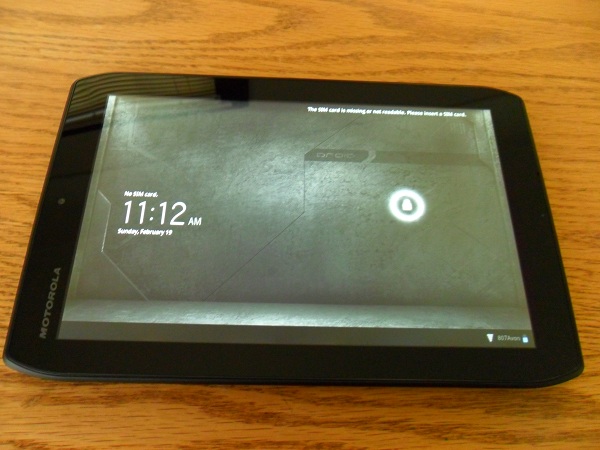
- Size – Holding the Droid Xyboard 10.1 in landscape orientation is just fine, but when switching it over to portrait it felt awkward to hold and touch the screen. When using the iPad, the transition from landscape to portrait is seemless, but on the Xyboard it feels more like a liability.
- Software – Honeycomb is a lowlight and a highlight of the Droid Xyboard. While it runs very fast, the User Interface is very clunky and not easily learned by all people.
Overall

This is THE best Android Tablet, no doubt about it! Great display, amazing camera, super-fast processor, and running on Verizon’s 4G LTE Network, the Droid Xyboard absolutely smokes the other Android Competition and in some ways, even the Apple iPad.
I would recommend the Droid Xyboard 10.1 for Android enthusiasts, business people, or teachers. But if you are a first-time smartphone or tablet user, I would recommend checking out something else. You can read more about and purchase the Motorola Xyboard here.








 Teague Loughman